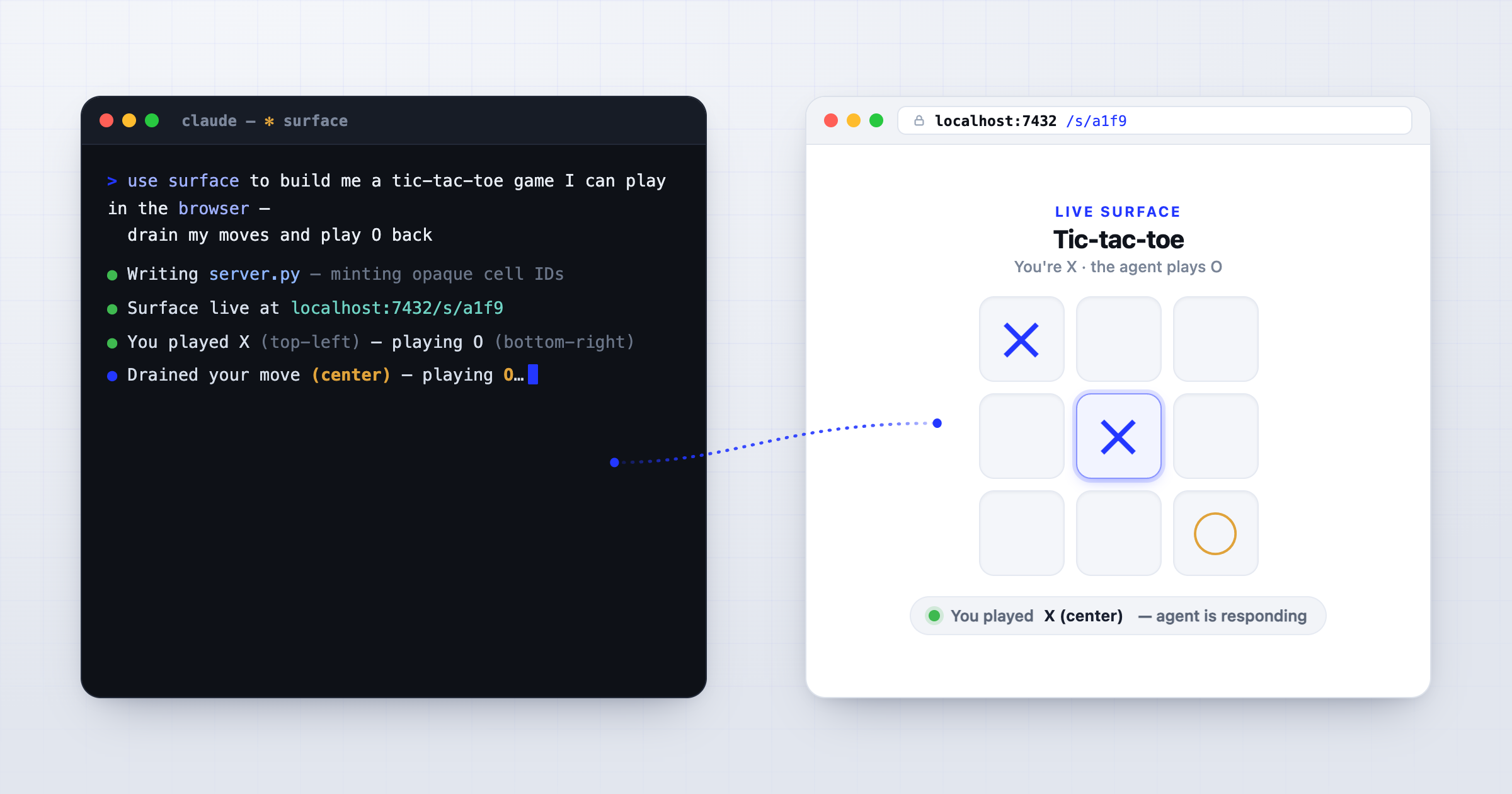
Anthropic announced Artifacts for Claude Code today, building on and productizing ideas that Anthropic’s Thariq laid out in the unreasonable effectiveness of HTML. Around the same time as he published that post, I was working on a way to interact with my agents away from the chat UI, with HTML as the main interface. With Artifacts now in beta and available for Team and Enterprise plans, I’m publishing my Surface skill, which does some similar things but adds features that I think make HTML even more powerful — in particular, the ability to interact with your agent through the page instead of returning to chat, and to have the agent come to you with a page when it needs you — even when you’ve stepped away, or when it’s working on its own in the background.
In short: Surface is a skill that has your agent stand up a real, interactive web page — its own little server — hand you the URL, then watch the page and react to what you do on it, no copy-paste back to chat.
The core idea Thariq shared: instead of having your agent hand you a wall of markdown, have it hand you an HTML page. It reads better, it shows more, and — his actual point — it keeps you in the loop with what the agent is doing, instead of buried in text documents. He’s right. I’d been working with HTML on my own, but his post really crystallized the idea as the way forward.
But generated HTML without a backend is just a display. You can look at it — but you’d maybe like to click something, rank a few options, hand a row back, and there’s no one on the other end. Whatever you do on the page has to be copied back out by hand (which is how the /playground skill and Artifacts work). That’s the gap the Surface skill fills. You ask your agent for a page and it stands up a real one backed by itself, not a custom backend, then hands you a URL and watches that page and reacts to what you do on it. No reload, no export button, no pasting the result back into chat. The agent is the backend, so the loop closes itself.
Artifacts in Claude Code publish a live web page straight out of a session — hosted, versioned, with a gallery and a shareable URL. It looks genuinely great. Surface isn’t a reaction to it; the two were built in parallel. I was planning to share Surface alongside some other tools I’ve been building, but I’m publishing it today because I think what Surface adds is valuable — and I wouldn’t be surprised if at some point Artifacts provides something similar. It’s available today to anyone, and it works with OpenAI’s Codex too.
What Artifacts is great at
Artifacts nails zero setup, hosting, versioning, org auth. You make a thing in a session, you get a link, you drop it in your team’s channel. It’s a product.
Anthropic is also clear about what artifacts do and don’t support: “an artifact is a capture of work, not an application. It is one self-contained page with no backend, so it cannot store form input, call an API at view time, or serve multiple routes.” The sandbox “blocks scripts, stylesheets, fonts, and images loaded from any other host, along with fetch, XHR, and WebSocket calls.” Sharing “stops at your organization.” And for now it’s Team and Enterprise only, signed in with /login — though that’ll almost certainly change.
When you want to update an artifact, or pull a result out of one, you go back to chat. The docs even ship a “Copy as prompt” example for exactly that — the same move as /playground.
What Surface does that Artifacts don’t (yet)
Almost everything an artifact rules out by design is the list Surface is built for. The dividing line is that copy-paste step: an artifact can show you a result and hand you a prompt to carry back to chat; a surface takes the input back, and the agent — which is the thing watching the page — just reacts. From there it cascades:
- It closes the loop. You do something on the page — pick from a big set, rank options, upload a file, draw on something, work through a runbook — and the agent drains it and reacts. No “copy this and paste it back.”
- It reaches anyone, on any channel. A surface is just a URL — and not only a localhost one: the agent serves it wherever your environment can reach (a tunnel, your own box, whatever you’ve got or tell it to use — there’s no Surface-hosted service). So the link can go to someone who isn’t you at all — a contractor or a friend, on their phone, over SMS or email, without giving them anything else. No sign-in, no org boundary.
- Several people can share one. A surface is a URL that takes input back, so more than one person can act on the same one — a team vote, a shared review, a canvas where trusted people give the agent direction. Artifacts are “viewable, not co-edited” — people you share with see your page but can’t act on it; a surface lets them participate.
- It can do things at view time. Because the agent builds a real server, the page can
fetch, talk over a websocket, call an API, serve more than one route — the things a no-backend sandbox sets aside. - The agent can come to you — even when you’re away. A surface doesn’t need you sitting in a chat window. Walk away, and the agent can send you one the moment it needs a decision; a background agent can send you one mid-task, for you to answer whenever. (Artifacts publishing is off by default in exactly the automated contexts a background agent runs in — Agent SDK, GitHub Action, MCP servers.)
- It runs anywhere. Surface is a skill, not a hosted feature — it doesn’t assume a stack, and it isn’t tied to a plan tier or a single harness. It works in Claude Code and in Codex, and it builds whatever server makes sense in your environment.
Here’s the cleanest way I’ve found to say it: a “Copy as prompt” page is one-way — you turn dials, it hands you a prompt to carry elsewhere. A surface is two-way — you act on the page, the agent on the other end does the work, and the result comes back into the page.
And the agent doesn’t have to build a bespoke backend to make that happen. Surface is a generic pipe: it carries whatever the page sends to the agent, and whatever the agent sends back. Your agent supplies the meaning — what each control does, how to respond — per task.
What I use it for
Triaging lists is a common use — the agent hands me a page of items and I approve, reject, or comment, and it acts on my picks without me typing anything back. Runbooks are another one: a list of commands with a copy button per step, ticking each off as I go (handy for the rare thing the agent can’t just do itself). I’ve also had my agent compose Surface with /playground, which gives /playground a responsiveness it lacks by default — and it’s great for poking at a prototype, where a free-text box on the page lets me keep talking to the agent without dropping back to the CLI, and watch the surface update without leaving the browser. But the real upshot is that because your agent knows details of the project it’s in, it’ll make surfaces that are fit to the project. Generic examples are cool, but the real impressive stuff comes from the agent using the project context to make the surface really useful.
The controls on a surface are opaque IDs the agent maps to specific intents, so a submission can only mean what the agent already decided it could mean — typed data, not free instructions. Past that, it’s for you and your agent to decide: a surface on localhost is a different consideration than one you expose externally, a free-text input or file upload introduces added risk, and either way you have to think about what the agent has access to.
So, which one?
Mostly this isn’t a “which one” — they’re aimed at different moments. Artifacts is a polished, hosted way to show work and share it inside your org, fully inside the Claude ecosystem. Surface is a skill in a plugin, that you can use or modify. It’s got fewer restrictions, but leaves some things up to you and your agent (including security protections). And most importantly, it changes where you have to be. Even an artifact the agent publishes on its own is something you act on and update by going back to chat — it keeps pulling you to the session. A surface lets the agent come to you, and lets you answer right there on the page, wherever you are. That’s what makes it work for the away-from-the-terminal, agent-reaches-you-when-it-needs-you kind of thing. I don’t know if this’ll make its way into a future Artifacts update (for various reasons), but I think the pattern that makes it work is a meaningful change to how we interact with agents.
Try it
Surface is a skill — free and open (Apache-2.0), no plan tier. In Claude Code (CLI or Desktop):
/plugin marketplace add aac/surface
/plugin install surface@surface
On Codex, clone the repo and symlink the skill:
git clone https://github.com/aac/surface
ln -s "$PWD/surface/skills/surface" ~/.codex/skills/surface
Then ask your agent:
use the surface skill to build me a tic-tac-toe game I can play in my browser, on a tldraw board — drain my moves and play O back
Your clicks land as X; a second later O appears, played by the agent on the same page — that one ask exercises the whole pattern. Or, in a project you’re already working in, just say:
use the surface skill to show me something cool in this project
and watch it build something fit to what you’re actually doing.
One caveat: I’ve mostly run Surface with Opus, plus some testing through Codex. Building a surface — standing up the server, draining your input, reacting — is a real agentic task, so it leans on a capable model. It’s designed to be harness- and model-agnostic, but if a lighter model gives you a broken page, try a stronger one before concluding it doesn’t work.