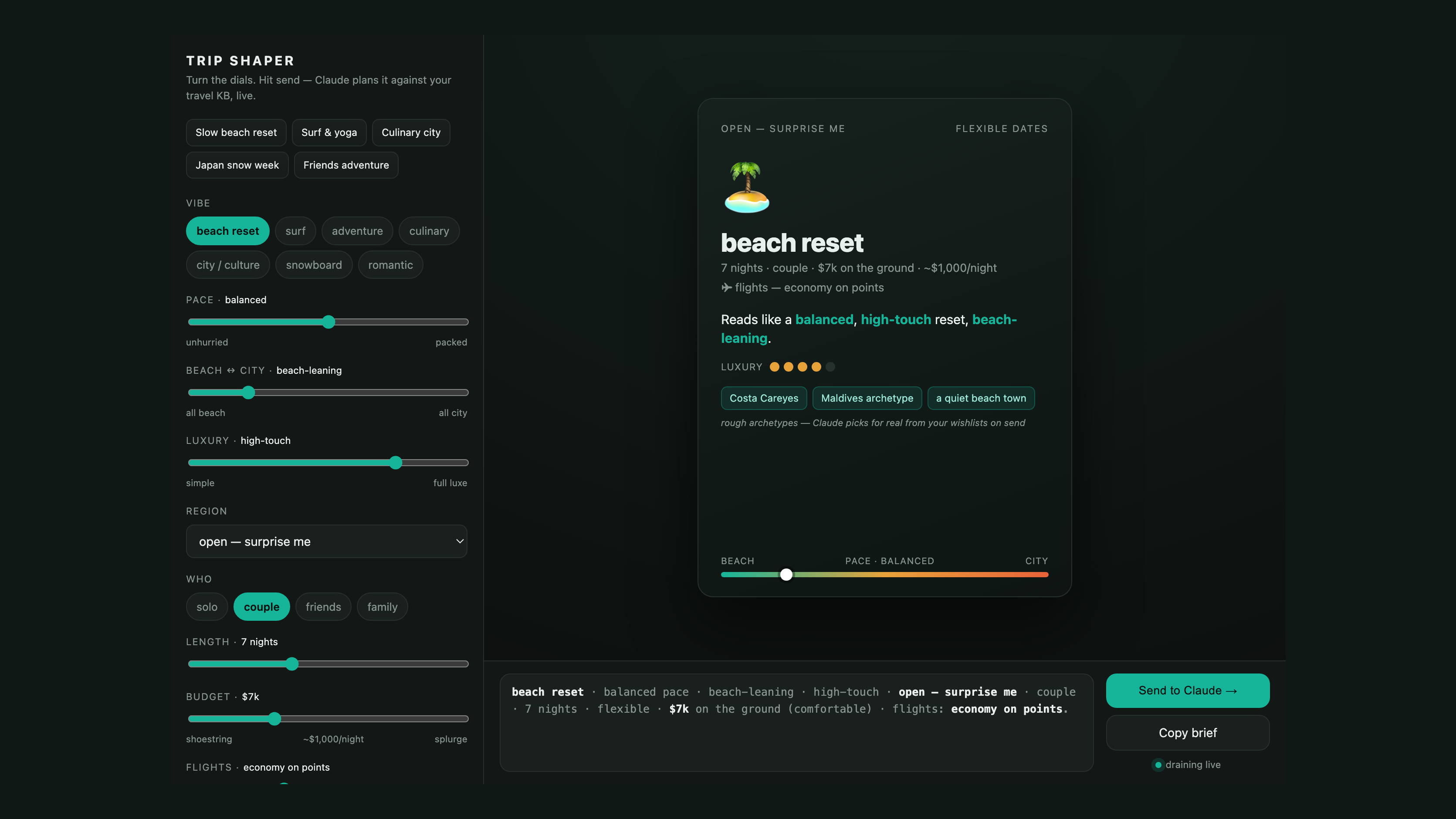
Anthropic’s playground skill builds a self-contained prototyping UI: a single HTML file with controls on one side, a live preview on the other, and a prompt with a copy button at the bottom. You turn dials until the preview looks right, then copy the prompt and paste it into Claude.
That copy step is the tell. A playground is a prototype designer: the preview is a mockup, the controls have nothing behind them, and the prompt it hands you is a spec. You copy it out because the playground can’t do the work itself — an agent has to take your description and build the tool for real.
The move
I had an agent wire a playground to surface, which I wrote about a few weeks back: a pattern — and a skill — where your agent stands up a real page, hands you the URL, then watches the page and reacts to what you do on it. Pointed at a surface instead of the clipboard, the playground stops being a mockup. The agent is the backend now, so the prototype already is the working tool: turn the dials, hit send, and the agent does the real work and writes the answer back into the page. There’s no prompt to copy anywhere, because there’s nothing left to build.
I asked Claude for demos and let it choose. It built a poster generator and the trip-shaper up top, whose sliders re-plan a real trip against my travel wishlist every time you hit send — drag the budget down, add flights on points, and the recommendation re-ranks live.
💡 I do this often — having agents come up with their own ideas, and write their own prompts, to demonstrate a new tool.
The prompts for these amount to a sentence apiece — the poster generator’s, for example:
Use the playground skill to build a poster tool — controls for palette, motif,
grid, and density, with a live preview — and wire it to surface so I configure
it visually and the agent renders the result back into the page. No copy-paste.
What kind of backend this is
Making a config panel do real work normally means writing a backend for it: an endpoint built for that one panel, coded in advance to understand its requests and fulfill them. Surface isn’t that — it’s a generic pipe, with the agent supplying the meaning at runtime. Your actions aren’t proxied through logic somebody wrote ahead of time; the agent reacts to them directly, so you can ask a follow-up, or tell the tool to add a slider and watch it rebuild. And because the wire format is generic, that new slider needs no backend work: the agent adds the control and handles whatever comes through it.
You could build one of these and use it for the life of a project, or just spin it up for a one-off and tear it down when you’re done — the underlying pattern, the generic agent backend, fits either way. Putting a playground on a surface turns the mockup into a live tool you can share with a link. Grab the playground skill, point it at surface, and see what your tools can do once the backend can actually answer.