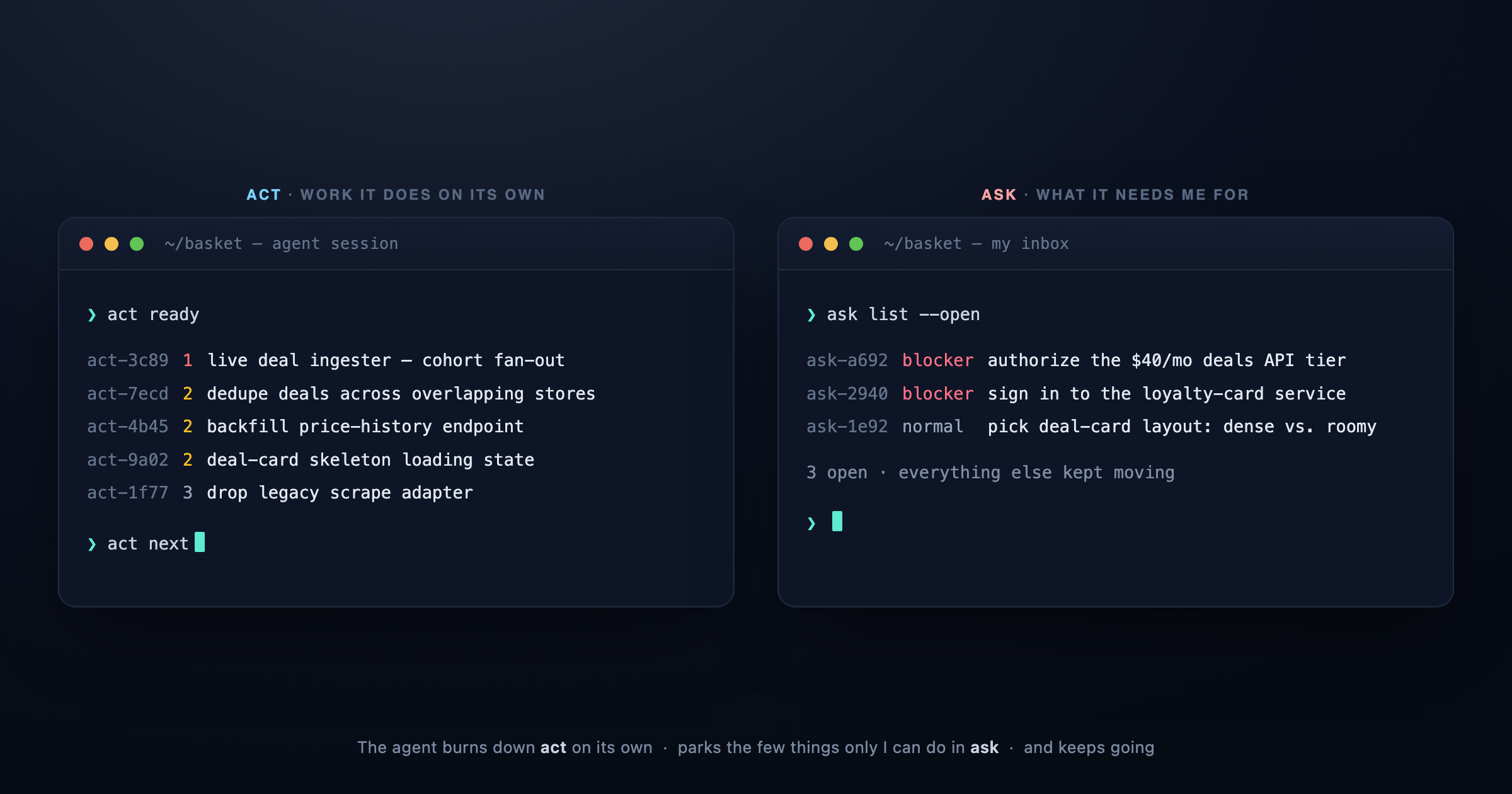
Two task trackers are the backbone of my agentic workflow. They’re what let my agents run long tasks without me hovering. The first — act — is an agent-first, per-project task tracker. The second — ask — is an agent-first, per-project inbox for the tasks the agent needs me to do. Together with surface, which I released last week, and reach, they let me kick off work and walk away from the computer, getting pulled back only when the agent actually needs me — from wherever I am.
The default, and where it leaks
By default, Claude (in Claude Code and Cowork) and GPT (in Codex) manage their own todos — either with a tool the harness hands them, or by writing to a file. The harness tools don’t survive across sessions, and the files get created ad hoc, so the agent reinvents the pattern every session. In my experience that loses work: tasks proliferate across files and go stale, forgotten, or inconsistent. And dependencies live in prose, where nothing enforces them.
A durable tracker fixes both. It gives the agent one canonical place to manage tasks — picked up instantly in any new session, with no room to drift from the format. And because act enforces dependencies — between tickets, and on external blockers — agents can build graphs of dependent work, where finishing one ticket unblocks the next and some tickets spawn more. That turns a flat todo list into a dynamic workflow that responds to the work as it actually unfolds. Claude Code now ships /loop and /goal, but I’ve found that given a tracker, agents work through the queue without them — they intuitively know how to pull the next available ticket.
ask: the inbox for the things only I can do
Eventually an agent hits a ticket that’s genuinely blocked on me: a service that needs signing up, a 2FA code, or a decision where taste still gives me the edge — which of two designs to ship, whether to authorize a spend. In the normal Claude Code or Codex flow, that request scrolls past in the transcript and is lost unless I answer right then. Otherwise, work halts — even when the agent could happily keep going on something else.
That’s the second tracker. ask lets the agent file tickets for me, to get to when I get the chance. An ask ticket can register as an external dependency in act, so the blocked work stops getting picked back up until I’ve cleared it — and everything not blocked keeps moving in the meantime.
Built for agents, not dashboards
act and ask are both agent-native. They’re small CLIs — a help command covers the mechanics, and a bundled skill triggers their use whenever the agent needs to manage tasks or needs something from me. They ship as plugins. The simplest possible use is to open a new session and ask “what’s next?” or “do I have any asks?”
I took inspiration from Andrej Karpathy and Simon Willison, both proponents of simple CLI tools with agent-focused interfaces. act is adapted from Steve Yegge’s beads, which felt heavier than I wanted. Both tools are deliberately lightweight: no daemons required (though both bundle an MCP server), files written to gitignored folders (act keeps its own nested git repo), project- and environment-local by default. My act tickets aren’t meant to be shared with other contributors — they’re for my agents and my workflow. That said, they’re extensible: act has some support for broader distributed agent workflows, and ask’s interface could sit on a more complex substrate.
These are intentionally narrow. They’re not Linear or Jira with an agent skin — they’re the smallest thing that gives an agent a durable place to put work and a durable place to put requests. The whole design bet is that small and local beats featureful and hosted when the primary user is an agent that just needs to not lose the thread.
How I actually use them
In an interactive session, this mostly looks like prioritizing what the agent works on, or having it walk me through what it needs from me — that last part was the motivating case for surface. Instead of requests scrolling past in chat, the agent stands up a page of my open asks — each with the action to take right there — and watches it, picking up my answers the moment I submit.
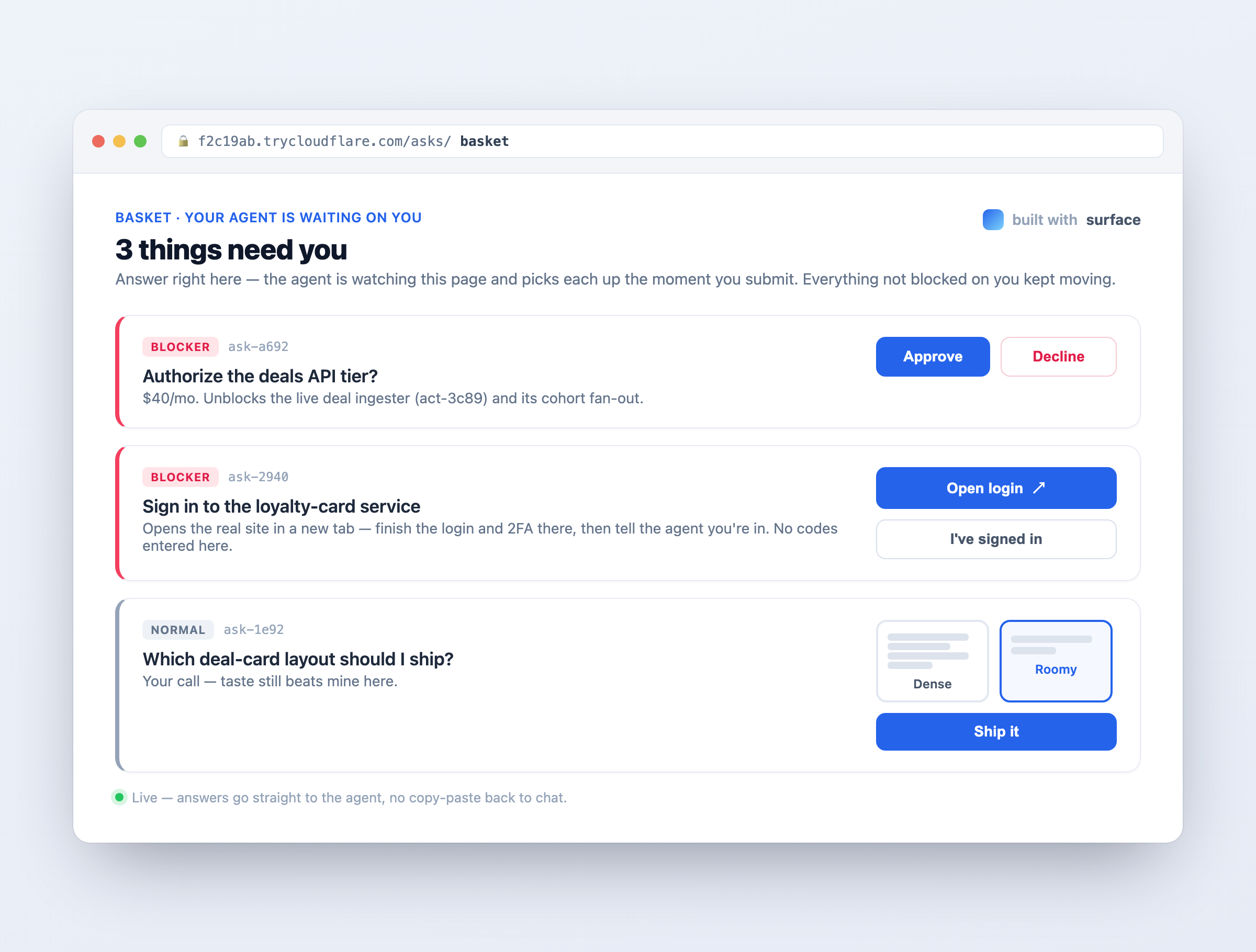
The same asks from the queue, handed to me as a page I can act on — wherever I am, no trip back to the terminal.
But the trackers shine in automation too. You can kick off a background agent with nothing but “burn down the tickets,” and it will — my /orchestrate skill does exactly that, fanning independent task streams across sub-agents. A separate tool lets me see every open ask across all my projects at once, so I can triage where to spend my attention.
I don’t have an unlimited token budget — I’m on a Claude Max plan — so I don’t run a swarm of agents constantly polling for work. Instead, each day I kick off agents against specific projects’ act queues, and I work through my ask tickets to unblock things. When I wrap for the day, I set agents loose on the backlog overnight, filing ask tickets for anything that needs me by morning. Together with some quota-management tooling I’ll probably write up later, act, ask, and an orchestrator mean I can have agents moving projects forward whether or not I’m sitting at my laptop.
Install
Both ship as plugins — free and open (Apache-2.0). Install them, and your agent drives them; you don’t run them by hand. In Claude Code (CLI or Desktop):
/plugin marketplace add aac/act
/plugin install act@act

/plugin marketplace add aac/ask
/plugin install ask@ask
On Codex:
codex plugin marketplace add aac/act
codex plugin add act@act

codex plugin marketplace add aac/ask
codex plugin add ask@ask
Then, in any project, just ask:
what's next?
and the agent will pull the top unblocked ticket and start. Or, when you come back to a project that ran while you were away:
do I have any asks?
and it’ll walk you through whatever it got stuck on — so you can clear the blockers and send it off again.
Or, dropping into a project you’ve already got going, seed the backlog from what’s already there:
scan this project for loose ends and open act tickets for them
and the agent files the stray TODOs, the bug you keep meaning to fix, the half-finished refactor — so the next background run has a queue to burn down.